If you’ve recently sent an email to the wrong address, don’t miss this Plugin
After merging the @FPT.COM domain, the Display Name on Outlook changed, sending emails easily leads to errors when the sender cannot see the recipient’s unit information. From here, the People Graph Plugin was born to restore this convenience for FSOFTers.
The article discusses a new plugin called People Graph, which addresses certain challenges within FSOFT related to email communication. Currently, when sending emails, only the account and display name of the sender are visible, with no indication of the sender’s work unit or department. Additionally, many employees do not set avatars on Outlook or use symbolic photos instead of personal ones, making it challenging to distinguish between individuals. This situation poses information security risks, especially concerning customer/project data and personnel information when emails are inadvertently sent to the wrong recipients.
To tackle these issues, the STU unit developed the People Graph Plugin in collaboration with IDX, IT, and FST units. People Graph functions as an Outlook Add-in and serves the purpose of providing FSOFT employees with information about the recipient’s work unit if that individual is part of the FSOFT family. Furthermore, this plugin allows users to choose between reviewing email recipients in the order they were entered (List) or grouping recipients by their respective units up to BU level (Group).
The rollout of this plugin is scheduled to automatically integrate into the Outlook accounts of all FSOFT employees starting next October, and there are plans to extend its availability to the entire FPT Group.
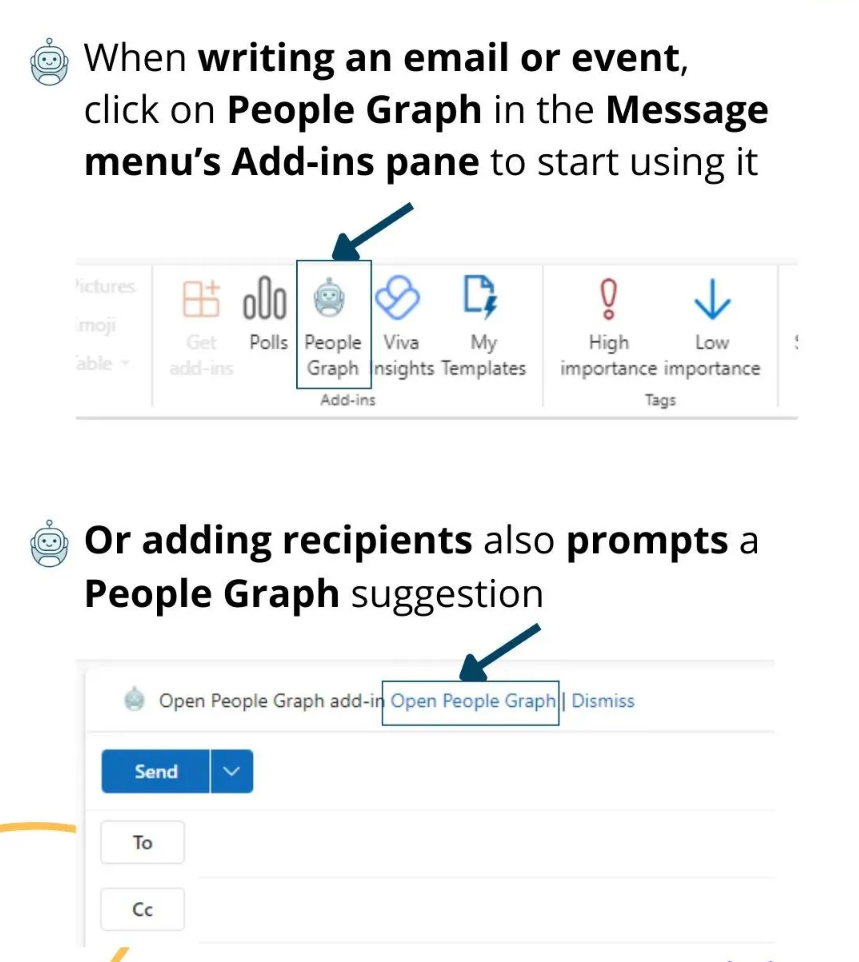
People Graph is compatible with Outlook O365 and Outlook Web versions. To use this plugin, FSOFT employees simply need to click on the icon located under Add-ins, followed by People Graph, or utilize the suggested Message Tooltip (which appears in the email creation box) as per the provided instructions.