CodeVista rolls out major updates with AI Model Selection to enhance Developers’ experience
CodeVista has officially released version 1.6.0, introducing a host of significant enhancements designed to elevate the developer experience. The most notable addition in this update is the AI model selection feature, offering users greater flexibility and personalization in how they interact with the platform.
With this release, CodeVista now allows users to manually select from a range of advanced large language models (LLMs) to handle tasks within the chat interface. This advancement marks a critical shift from a one-size-fits-all approach, empowering developers to tailor AI usage based on project requirements, task complexity, or individual preferences.
The newly supported AI models include:
- Claude 3.7 Sonnet (recommended for coding tasks)
- Claude 3.5 Sonnet
- OpenAI GPT-4o
- OpenAI GPT-4o mini
- Gemini 2.0 Flash
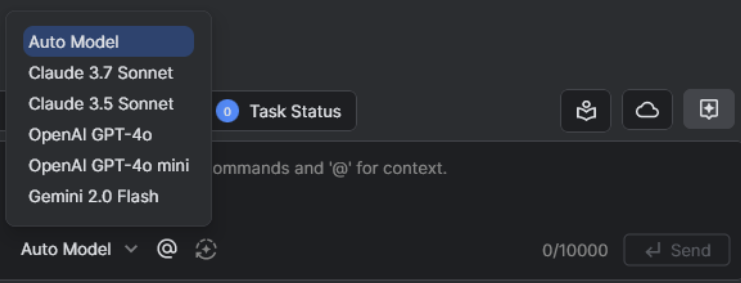
These integrated models enable users to match the AI engine to the specific nature of their work. Additionally, the new “Auto Model” option allows CodeVista to automatically analyze user prompts and select the most appropriate model, streamlining the process and optimizing productivity without the need for manual selection.
The value of this feature lies not only in its versatility but also in its ability to leverage the unique strengths of each model for specific use cases – from code generation and logic analysis to technical documentation. This empowers developers to save time while significantly improving output quality.
In tandem with its technical enhancements, CodeVista v1.6.0 also debuts a refreshed user interface focused on improving clarity and usability. Key updates include:
- A streamlined chat interface, designed for cleaner and more organized interactions.
- An improved prompt editor and prompt library, helping users efficiently search, reuse, and manage command templates.
- An overall modern UI/UX that not only improves comfort during extended use but also supports a more structured and efficient workflow, reducing unnecessary steps and boosting productivity.
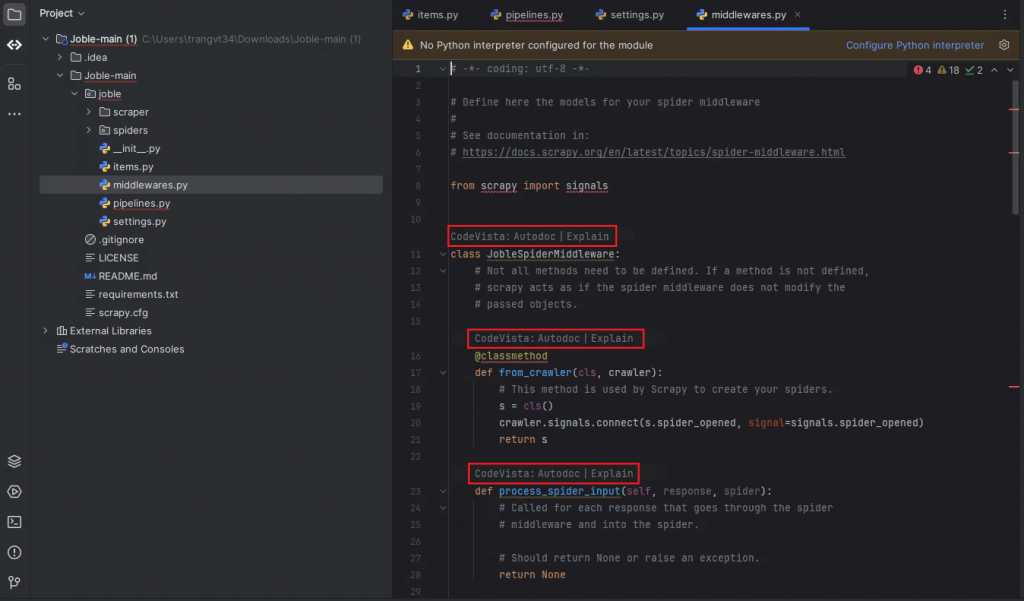
A major highlight of this version is the deepened integration with JetBrains IDEs, including IntelliJ and PyCharm. Previously, accessing features like Autodoc or Explain required manual actions such as selecting code, right-clicking, and navigating through the CodeVista menu.
With the new release, Autodoc and Explain buttons now appear directly above each function in an open file, enabling users to generate comments or explanations with a single click. This enhancement simplifies documentation and logic clarification, making these tasks faster and more intuitive.
Additionally, Autocomplete functionality has been significantly upgraded. It now considers all relevant open files rather than limiting suggestions to the currently active file. This improvement shortens the code analysis and documentation process and is especially beneficial for teams adhering to strict coding guidelines or working within Agile development environments.
With the launch of version 1.6.0, CodeVista reaffirms its commitment to empowering developers through smart automation, deeper integration, and enhanced user control – setting a new standard for AI-assisted software development within the organization.